

Introduction
A few months ago, I sat at my desk staring at a blank screen for almost an hour. I had a topic, I had coffee, but I had zero words. Sound familiar? That is exactly when I started exploring how to use AI tools for writing at home and honestly, it changed everything for me. AI writing tools are no longer just for big companies or professional writers. Today, anyone sitting at home with a laptop can use them to write blogs, emails, social media posts, and even full articles. You know what’s the best part is? You do not need any technical skills to get started. In this blog, I will walk you through everything step by step so you can start using AI tools for writing at home today.
Understand What AI Writing Tools Actually Do
Before you jump in, you should know what these tools really do. AI writing tools use artificial intelligence to help you write content faster and better. You give the tool a topic or a sentence, and it generates text based on your input. Think of it like a very smart assistant who never gets tired. Tools like ChatGPT, Jasper, Copy.ai, and Writesonic all work this way. They do not replace your brain they work with it. You still have the freedom to make all the decisions on your own.
Choose the Right AI Tool for Your Needs
Not every AI tool works the same way, so picking the right one matters a lot. Here is a simple breakdown to help you choose:
- ChatGPT (chat.openai.com) — Best for beginners. Free to use. Great for blog writing, answering questions, and brainstorming ideas.
- Jasper AI (jasper.ai) — Best for professional bloggers and marketers. Paid tool but very powerful.
- Copy.ai (copy.ai) — Great for short content like social media captions, product descriptions, and email subject lines.
- Writesonic (writesonic.com) — Good for writing full blog posts quickly with SEO in mind.
- Rytr (rytr.me) — Very affordable. Great for beginners on a budget.
Set Up Your Workspace Before You Start Writing
This step sounds simple, but most people skip it and regret it later. Before you open any AI tool, set up your writing workspace properly. Open a Google Doc or Microsoft Word document where you will paste and edit your content. Keep your AI tool open in another tab. Have a notepad nearby to jot down ideas. A clean, organized workspace helps you stay focused and work faster. This simple setup saves at least 30 minutes for every single writing session.

Write a Clear and Specific Prompt
The quality of what an AI tool gives you depends completely on what you ask about it. This is called a “prompt”. A weak prompt gives you weak content. A strong prompt gives you something actually useful. Here is the difference:
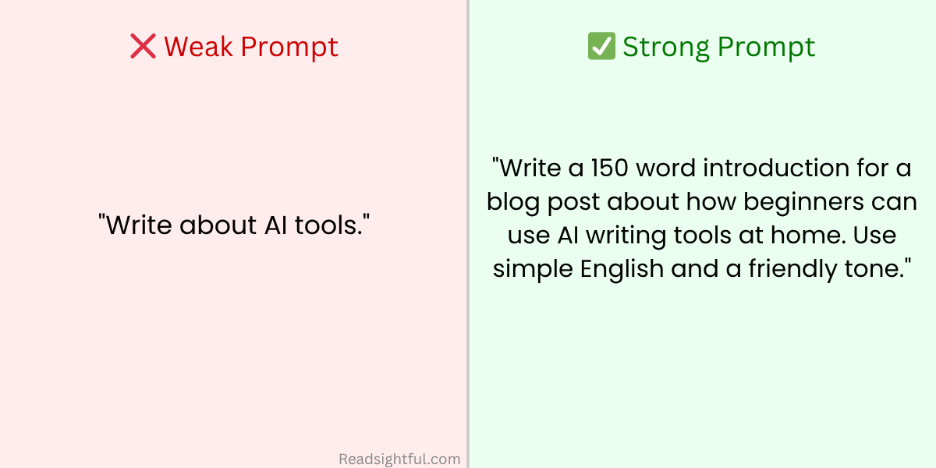
Always include the topic, the length, the tone, and the audience in your prompt. The more specific you are, the better the output. Spending just 2 minutes crafting a strong prompt can save up to 20 minutes of editing later.
Edit Everything the AI Writes
Most people skip editing and that is the biggest mistake they make. After your AI tool generates the text, always read it carefully before using it anywhere. Fix the parts that sound stiff or unnatural. Add a joke, a personal experience, or your own opinion to bring it to life. The difference between content that feels genuine and content that feels robotic almost always comes down to how well you edited it.
Use AI to Beat Writer’s Block Instantly
Every person who writes anything, whether it is an essay, an email, or a simple message, knows that horrible feeling when the brain just goes completely blank. You stare at the screen, the cursor keeps blinking, and nothing comes out. This is called the writer’s block, and it happens to absolutely everyone. The good news is that AI tools destroy writer’s block in seconds. Just open any AI tool and type something like “Give me 10 different ways to start a piece of writing about [your topic].” Before you even finish your tea, you have 10 solid options sitting right in front of you. Pick the one that feels natural and start building from there. The blank page problem that used to steal hours of your time now takes less than a minute to solve.
Check Your Content for Plagiarism and AI Detection
Writing great content is only half the job. Making sure that content is clean, original, and trustworthy is the other half. Before you share or submit anything you have written with AI help, always run two quick checks. First, paste your content into a free plagiarism checker like Duplichecker.com or Smallseotools.com. These tools scan your writing and instantly tell you if any part of it matches something already published on the internet. If everything comes back clean, you are good to go. Second, run your content through an AI detection tool like ZeroGPT.com to see how natural and human your writing sounds. If the score feels too robotic, do not panic. Simply go back, rewrite a few sentences in your own natural voice, add a real-life example or a personal thought, and check again. The goal is writing that feels genuinely human and with a little editing, it always does.
Build a Writing Routine Around AI Tools
Here is something most people never tell you the secret to producing great work consistently is not talent; it is a simple routine. People who use AI tools randomly and without any plan end up wasting more time than they save. Here is something most people never tell you the secret to producing great work with AI tools is not about how fast you move, it is about following the right pattern every single time. People who skip steps and rush through the process always end up with average results. But people who follow a clear and consistent pattern produce work that stands out every single time. Here is the exact pattern you should follow to produce a high quality piece of work with AI tools:
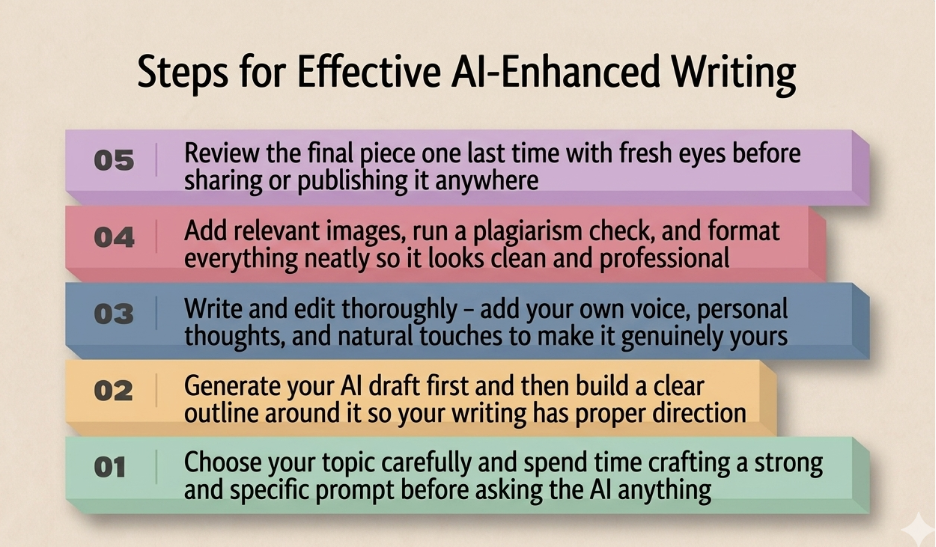
Following this five-step pattern every single time means you will consistently produce high quality work without stress, without confusion, and without wasting time going back to fix mistakes. The pattern is simple, but the results it delivers are anything but ordinary. Remember one well-crafted piece that follows this pattern is always worth more than ten rushed pieces that skip it entirely.
Keep Learning as AI Tools Keep Improving
Here is something truly exciting the AI tools available today are already mind blowing, but they are nowhere near their final form. Every single month, these tools get smarter, faster, and more capable than before. Features that did not exist six months ago are now standard. Things that felt impossible in 2023 are completely normal in 2026. This means that the more time you invest in learning how to use these tools, the more powerful your results become over time. Make it a habit to spend even just 10 to 15 minutes every week exploring something new inside your AI tool. Watch a short YouTube tutorial. Try a prompt you have never used before. Read about a new feature that just launched. The people who treat AI tools as something to master rather than just something to use will always produce better work than those who stay stuck using the same basic commands forever. Learning never stops and honestly, that is what makes this whole journey so exciting.
Conclusion
The world of writing has changed forever, and AI tools sit right at the center of that change. What once took hours of staring at a blank screen, struggling with words, and second guessing every sentence now takes a fraction of the time. But the real magic is not in the speed, it is in what you do with the extra time and energy these tools give back to you. Use that time to think deeper, research better, and add the kind of human touch that no AI can ever replace on its own. The people who win with AI tools are not the ones who use them the most they are the ones who use them the smartest. So, take what you have learned today, open any free AI tool, and start creating something worth reading. The blank page is no longer your enemy. You just found the tool that proves it.
Still want to learn more about AI writing tools? Watch this beginner friendly video that explains everything visually.
FAQs
Yes absolutely. Most AI writing tools like ChatGPT are designed to be beginner friendly. You do not need any technical skills or writing experience to get started. Simply type what you need and the tool does the rest.
Many AI writing tools offer a free plan that gives you enough features to start writing right away. Tools like ChatGPT and Rytr have free versions that work perfectly well for beginners writing blogs, emails, and assignments at home.
Google does not penalize AI assisted content as long as it is helpful, original, and edited properly. The key is to always read and improve the AI output before publishing. Add your own voice, opinions, and personal touches to make it genuinely valuable for readers.
AI tools can cut your writing time by up to 50 to 70 percent. A blog post that normally takes 4 to 5 hours to write can be completed in under 2 hours when you use AI tools the right way for outlining, drafting, and editing.
ChatGPT is the best starting point for beginners because it is free, easy to use, and works for almost every type of writing task including blogs, emails, social media posts, and assignments. Once you get comfortable you can explore other tools like Jasper or Writesonic for more advanced features.